

Why passwords are no longer enough
In an operational environment – dispatchers, pilots, and charter sales staff logging in from different locations and devices – a classic password has three weaknesses:
- it can be phished or observed,
- it can be guessed or brute-forced if it's too simple,
- it tends to get written down, shared, or reused across systems.
A passkey removes the causes of these incidents entirely: there is nothing to phish, because no secret is ever typed into the login screen.
How a passkey works
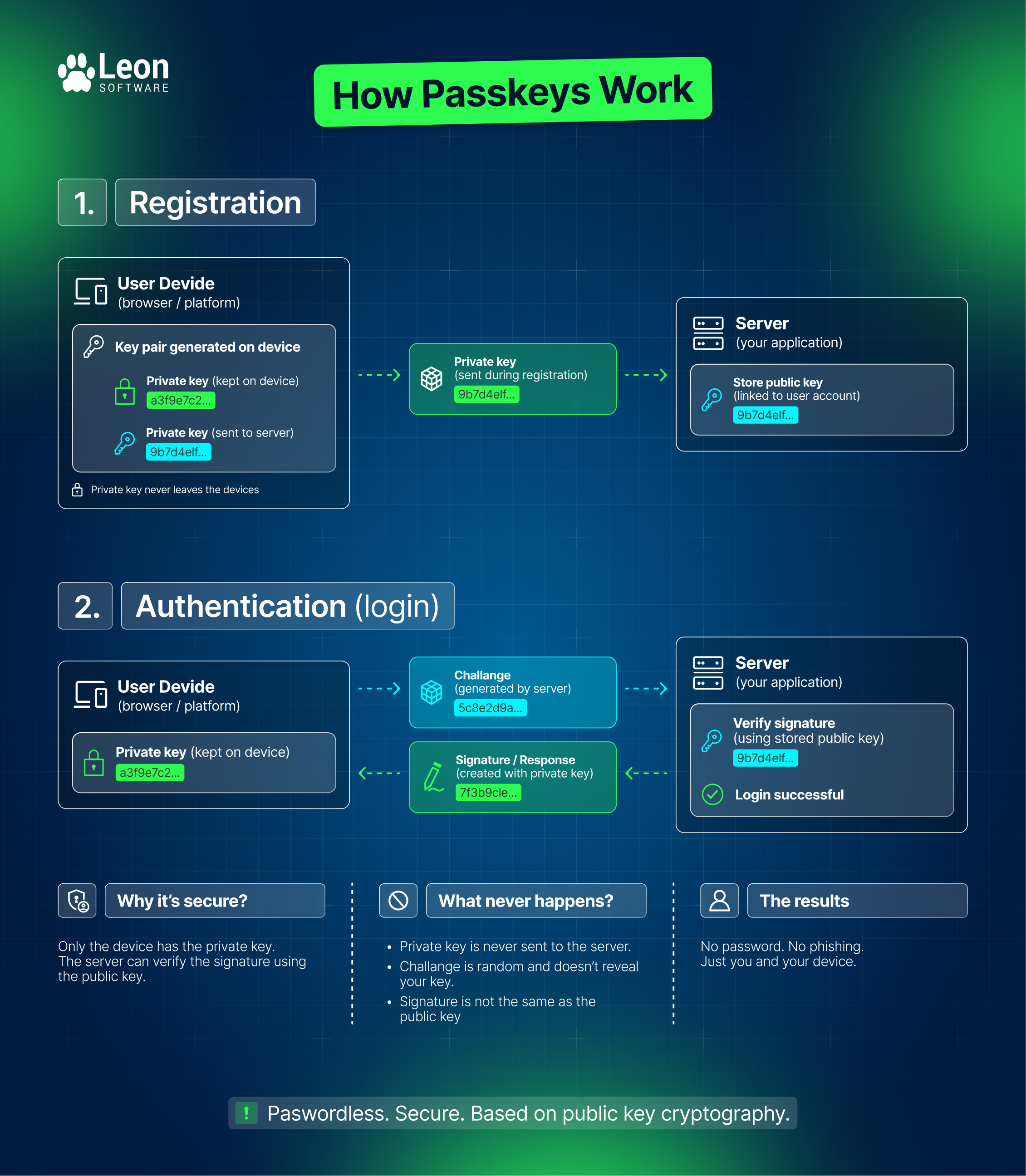
A passkey is built on public-key cryptography and the FIDO2 standard (WebAuthn + CTAP2):
- The device generates a key pair. The private key stays on the user's device (phone, laptop, or hardware key) and never leaves it. The public key is registered with the service being logged into.
- The user confirms their identity locally – with a fingerprint, Face ID, or device PIN. This confirmation is never sent to the server.
- The device signs the login challenge using the private key, and the server verifies that signature with the public key.
The result: the server never stores a secret that could be stolen in a data breach and reused elsewhere. Each key is unique to that service and that device.
What this changes for logging into Leon
Logging into Leon differs from a typical SaaS app in that user identity is built on three elements: operator code, login, and password – not just an email address. A passkey won’t replace that structure; it will replace the step of typing a password with a secure confirmation on the user's own device, after the operator and login have been identified.
This sits alongside two mechanisms Leon already has:
- Self-service password reset – a user who forgets their password can reset it from the login screen using a one-time link valid for 30 minutes, without involving an administrator or Support.
- Two-factor authentication (2FA) – an optional security layer based on a TOTP code from an app like Google Authenticator, which an administrator can enforce globally for all of an operator's users under Settings, General Settings, Security.
A passkey fits the same logic of “security layers the administrator controls”. It can be implemented in two ways. The first one will allow Leon users to log in using a password and a passkey in a form of the second authenticating factor. In the future, we will also implement the passwordless variant, which removes the password-entry step from the equation entirely. Both of these are a security measure against the biggest risk: phishing of the login page.
Benefits of a passkey
- Phishing-resistant – there's no password, so there's nothing to steal with a fake login page.
- Biometric login – a fingerprint, Face ID, or device PIN instead of typing a string of characters.
- Built on an industry standard – FIDO2 is already supported natively by most browsers and operating systems (Windows, iOS/macOS, Android), so users don't need to install anything beyond what's already on their device.
Passkeys and the 2FA requirement
For operators that have two-factor authentication enforced – including operators subject to the EU's PART-IS information-security regulation – a key question is whether logging in with a passkey satisfies the second-factor requirement on its own. A passkey combines something you have (the device holding the private key) with something you are (biometrics) or something you know (the device PIN) in a single step, so by definition it is multi-factor authentication. Leon Software will allow users to choose between using 2FA, a passkey or both.
FIDO Alliance passkeys specifically are currently used by some of the biggest corporations, such Adobe, Amazon, Facebook, Google, Microsoft and many more. For a full list, you can check out this site.
Conclusion
Passkeys will make logging into Leon more secure and convenient by replacing password entry with cryptographic authentication protected by the user's own device. They will reduce the risks of phishing, password reuse, and account sharing while working alongside Leon's existing password reset and 2FA mechanisms. For operators with enforced 2FA or PART-IS requirements, the exact relationship between passkeys and Leon's 2FA setting is still being defined and will be clarified in the product documentation.
FAQ
What is a passkey?
A passkey is a passwordless login credential based on public-key cryptography and the FIDO2/WebAuthn standard. A private cryptographic key is stored on the user's device, while the corresponding public key is registered with Leon.
Do I still need a password if I use a passkey?
The passkey is designed to replace password entry when logging in with a registered device. Leon Software's existing account structure – including the operator code and login – remains unchanged.
Can Leon Software see or store my fingerprint or Face ID?
No. Biometric information stays on the user's device. Leon Software receives the result of the authentication, not the user's fingerprint or facial data.
What happens if I lose my phone or laptop?
The passkey is tied to the authentication credential available on the user's device or password manager. If a device containing a passkey is lost, the user or administrator should follow the applicable account-recovery and credential-management procedures.
Can I use a passkey on different devices?
Yes. Passkeys are supported across modern operating systems and browsers, and depending on the platform they can be synchronised between a user's devices or stored on an individual device or hardware security key.
Is a passkey safer than a password?
Yes, especially against phishing. A passkey uses cryptographic authentication tied to the legitimate service, so a fake login page cannot simply collect the credential in the way it can collect a password.
Does a passkey replace 2FA?
That will be one of the options in Leon Software. Passkeys can provide multi-factor authentication because authentication can combine possession of the device with a local biometric or device PIN. However, operators will be able to choose between simply using a passkey, 2FA or both.
Does using a passkey satisfy PART-IS requirements?
A passkey is based on strong, phishing-resistant authentication and can provide multi-factor authentication. However, whether using a passkey alone satisfies a particular operator's PART-IS security requirements depends on the operator's security controls and how Leon implements its enforced-2FA policy. Operators should not assume that passkey authentication automatically replaces their existing 2FA requirement until this is formally documented.
Do I need to install an app to use a passkey?
Usually not. Passkey support is built into modern operating systems and browsers, including common authentication mechanisms such as Windows, iOS/macOS, and Android.
What if I forget my password after setting up a passkey?
Leon Software continues to provide its existing self-service password-reset mechanism. A user can request a one-time reset link from the login screen, with the link valid for 30 minutes.
Can a passkey be shared with another crew member or dispatcher?
A passkey should not be treated as a shared credential. It is intended to authenticate the individual using their own device and local authentication method. Sharing accounts or authentication credentials undermines individual accountability and security.
Will Leon Software still support passwords and 2FA?
Yes. Passkeys will be introduced as an additional authentication mechanism alongside the existing password and 2FA mechanisms.
What is the main benefit for Leon Software users?
The biggest benefit is removing the password from the most vulnerable part of the login process. Users will get a faster login experience while reducing the risks associated with phishing, password reuse, weak passwords, and password sharing.
Not yet a member of Leon community? Contact our Sales team to find out more or jump straight into the 30-day free trial.
TAGGED WITH
Latest from blog


Subscribe and Follow Us
